Connecting OpenDrive
This guide walks you through connecting an OpenDrive storage destination to Pluton.
Prerequisites
Before connecting OpenDrive, you need:
- An OpenDrive account - Sign up here
- Your OpenDrive username and password
About OpenDrive
OpenDrive is a cloud storage service that provides file storage, sharing, and synchronization. It supports modification times and MD5 hashes, enabling efficient incremental backups. Pluton connects to OpenDrive using your account username and password.
Getting Your Credentials
Step 1: Note Your Credentials
- Your Username is the email or username you use to log into OpenDrive
- Your Password is your OpenDrive account password
No additional API keys or tokens are needed — OpenDrive uses direct username/password authentication.
Connecting to Pluton
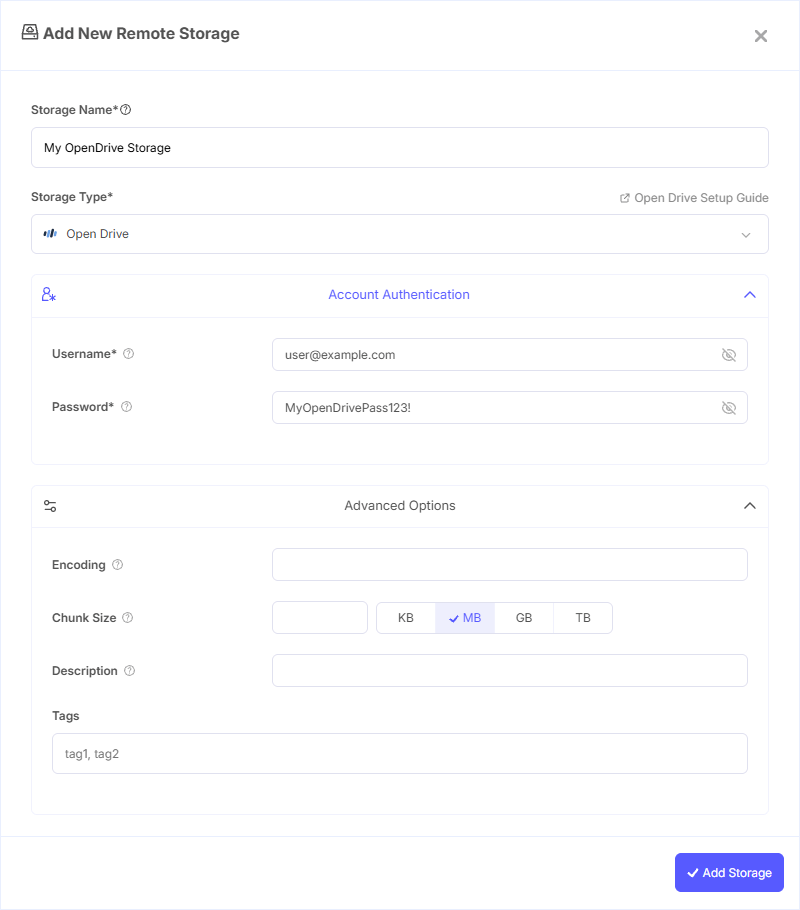
Step 1: Add Storage
- In Pluton, navigate to Storages
- Click Add Storage button
- Select OpenDrive from the provider list
Step 2: Configure Connection
Fill in the required fields:
- Storage Name: A friendly name (e.g., "OpenDrive Backups")
- Username: Your OpenDrive account username
- Password: Your OpenDrive account password
Step 3: Advanced Options (Optional)
Additional settings available:
- Chunk Size: Size of upload chunks (default: 10 MiB). Files are uploaded in chunks of this size. Increasing the chunk size will increase memory usage
Step 4: Complete the Storage Setup
- Click the Add Storage button which automatically verifies credentials and adds the storage.
- Your OpenDrive storage is now ready for backup plans
Common Issues
Authentication Failed: Double-check your username and password. Ensure you are using the correct email address associated with your OpenDrive account.
Upload Failures for Large Files: If large file uploads fail, try reducing the chunk size in advanced options to reduce memory usage per chunk.
Restricted File Names: OpenDrive does not allow certain characters in file names (e.g., ", *, :, <, >, ?, \, |). Files with these characters will be automatically renamed during upload. File names also cannot begin or end with spaces or certain control characters.
File System Features
Modification Times: OpenDrive supports modification times accurate to 1 second, enabling efficient incremental backup detection.
MD5 Hashes: OpenDrive supports MD5 checksums for data integrity verification.
Best Practices
- OpenDrive's support for modification times and MD5 hashes makes it well-suited for incremental backups with reliable change detection
- Keep the default chunk size (10 MiB) unless you have a specific need to change it — larger chunks use more memory
- Monitor your OpenDrive storage quota to prevent backup failures
- Avoid file names with special characters to prevent automatic renaming during upload