Connecting 1Fichier
This guide walks you through connecting a 1Fichier storage destination to Pluton.
Prerequisites
Before connecting 1Fichier, you need:
- A 1Fichier Premium account - Sign up here
- An API key from your 1Fichier account settings
A Premium subscription is required to use the 1Fichier API. Free accounts do not have API access.
Getting Your Credentials
Step 1: Get Your API Key
- Log into your 1Fichier account
- Navigate to Console → Parameters (or go directly to
https://1fichier.com/console/params.pl) - Locate the API Key section
- Generate a new API key if one doesn't exist, or copy your existing key
- Important: Save the API key securely — you'll need it for the Pluton setup
Connecting to Pluton
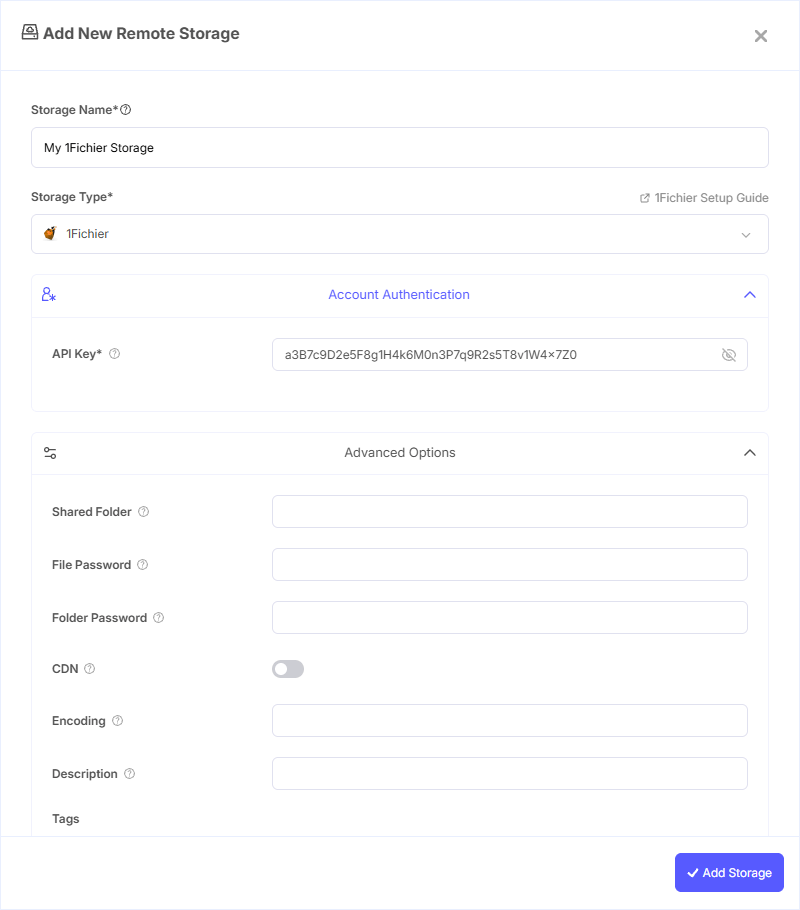
Step 1: Add Storage
- In Pluton, navigate to Storages
- Click Add Storage button
- Select 1Fichier from the provider list
Step 2: Configure Connection
Fill in the required fields:
- Storage Name: A friendly name (e.g., "1Fichier Backups")
- API Key: Your 1Fichier API key from the account console
Step 3: Advanced Options (Optional)
Additional settings available:
- Shared Folder: If you want to access a shared folder, enter the shared folder identifier here
- File Password: Password for downloading a password-protected shared file
- Folder Password: Password for listing files in a password-protected shared folder
- CDN: Enable to use CDN download links for faster file downloads
Step 4: Complete the Storage Setup
- Click the Add Storage button which automatically verifies credentials and adds the storage.
- Your 1Fichier storage is now ready for backup plans
Common Issues
API Key Invalid: Ensure you copied the full API key from the 1Fichier console. API keys may be regenerated if compromised.
Premium Required: The 1Fichier API is only available with a Premium subscription. Free accounts will receive authentication errors.
Duplicate Files: 1Fichier can have two files with the exact same name and path (unlike a typical file system). If you see duplicate file warnings in the logs, this is a known 1Fichier behavior.
Shared Folder Access: To access a shared folder, you must enter the shared folder identifier in the advanced options. For password-protected shared folders, also provide the folder password.
Best Practices
- Keep your API key secure and don't share it publicly
- Use a Premium subscription for reliable API access
- Be aware that 1Fichier does not support modification times — backups rely on file checksums for change detection
- Monitor your 1Fichier storage usage through their web console
- If using shared folders, ensure passwords are configured correctly for protected content