Backup Recovery Testing
Manual Integrity Check
Run an on-demand integrity check to verify your backup snapshots.
- Navigate to your backup plan details page
- Click "More Options (⋮)" in the header
- Select "Check Integrity"
- The integrity check starts and verifies repository data
- Results display when complete:
- Success: "No Corruption or Bit rot found. Your backup snapshots are completely restorable."
- Error: Details about detected issues with fix suggestions
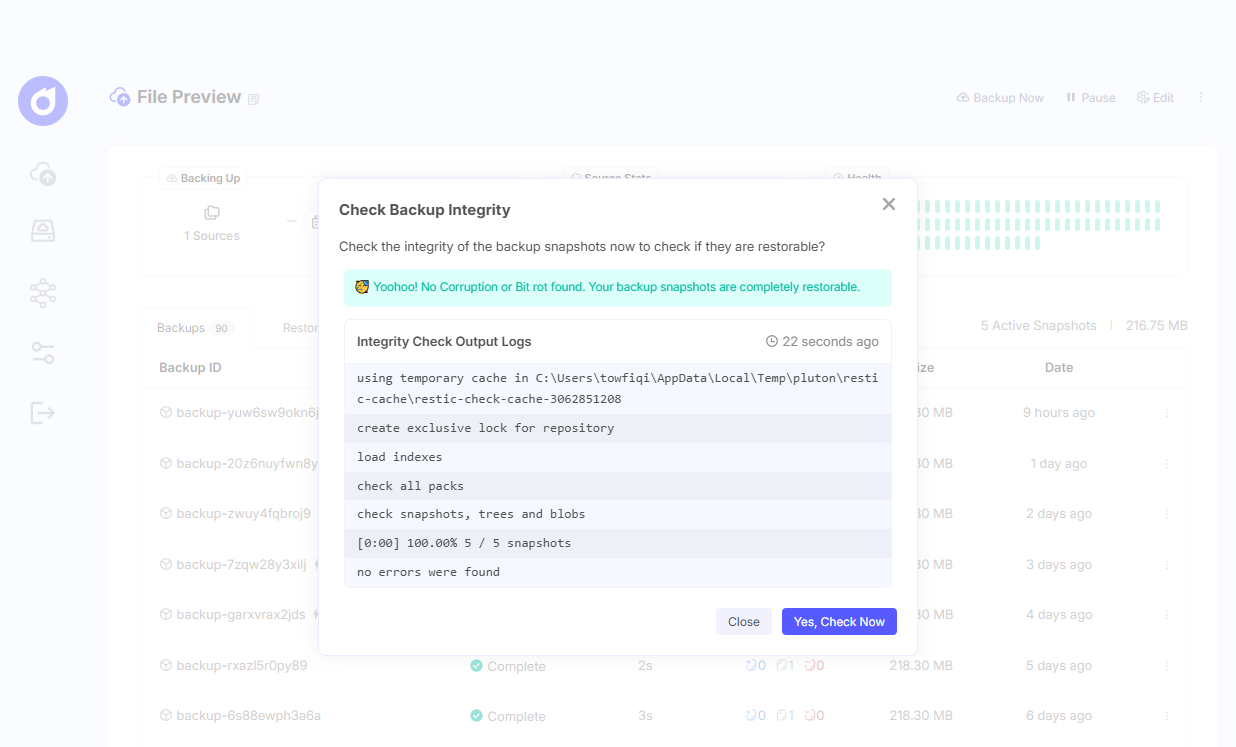
Output Logs:
- The integrity check output logs are displayed showing verification progress
- Logs include timestamp of when the check was performed
- Fix suggestions are provided if issues are detected
Scheduled Integrity Checks (PRO)
Pluton PRO's Automated Recovery Testing verifies your backup snapshots are restorable and free from corruption. This feature runs periodic integrity checks and alerts you immediately if issues are detected.
Configure automatic periodic verification of your backup snapshots.
Enabling Scheduled Checks
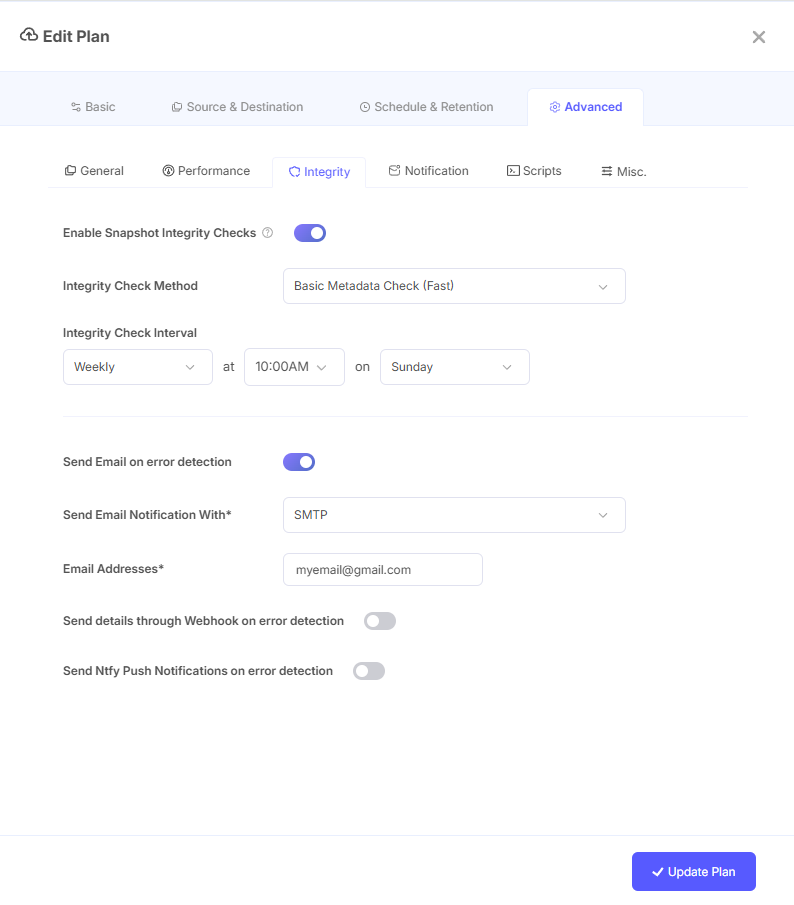
- Edit your backup plan
- Go to Integrity settings section
- Toggle "Enable Snapshot Integrity Checks" on
- Configure the check parameters:
- Integrity Check Method: Select verification depth
- Integrity Check Interval: Set how often to run checks
- Save your plan
Integrity Check Methods
Choose the verification depth based on your needs:
| Method | Description | Speed | Use Case |
|---|---|---|---|
| Basic Metadata Check | Verifies repository structure only | Fastest | Quick health check |
| 5% Data Check | Samples 5% of data blocks | Fast | Cloud storage (minimal bandwidth) |
| 10% Data Check | Samples 10% of data blocks | Fast | Cloud storage (low bandwidth) |
| 25% Data Check | Samples 25% of data blocks | Medium | Balanced verification |
| 50% Data Check | Samples 50% of data blocks | Slower | Higher confidence |
| Full Integrity Check | Reads all backup data | Slowest | Maximum verification |
Recommendations:
- Use 5-10% Data Check for cloud storages to minimize bandwidth and API costs
- Use Full Integrity Check for local storage or when maximum confidence is required
- Use Basic Metadata Check for quick structural verification
Check Interval
Set how frequently integrity checks run:
- Configure interval in hours, days, or weeks
- Recommended: Weekly for critical data, monthly for less critical data
- Consider storage costs when setting interval for cloud destinations
Integrity Check Notifications
Get notified when integrity issues are detected.
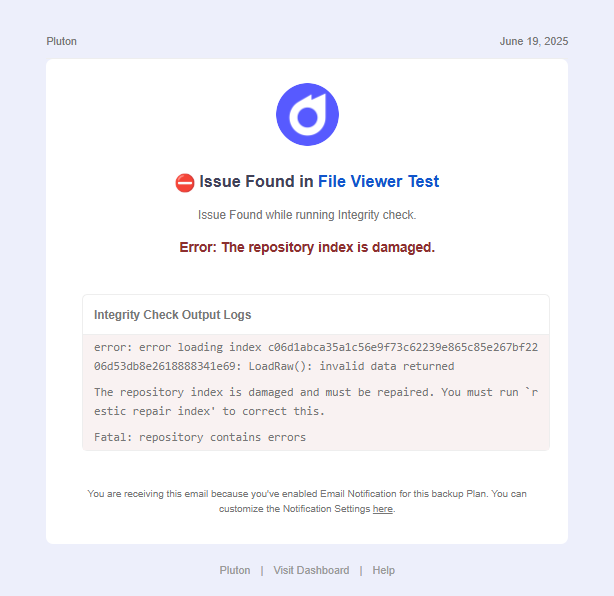
Email Notifications
- Toggle "Send Email on error detection" on
- Select an email integration (requires prior setup in Settings → Integrations)
- Enter recipient email addresses (comma-separated for multiple)
Webhook Notifications
Send integrity check results to external systems:
- Toggle "Send details through Webhook on error detection" on
- Select Content Type:
application/json,application/x-www-form-urlencoded, ortext/plain - Enter your Webhook URL
- Click "Send Test Request" to verify connectivity
Ntfy Push Notifications
Receive push notifications via Ntfy:
- Configure Ntfy Auth Token in Settings → Integrations
- Toggle "Send Ntfy Push Notifications on error detection" on
- Enter your Ntfy Push URL (e.g.,
https://ntfy.sh/mytopic) - Optionally add Tags for notification categorization
Viewing Integrity Results
Access the results of past integrity checks:
- Navigate to your backup plan details page
- Click "More Options (⋮)"
- Select "Check Integrity"
- View the last check results:
- Status (success/error)
- Timestamp of last check
- Output logs
- Fix suggestions (if errors detected)
Understanding Results
Successful Check:
- Confirms snapshots are complete and restorable
- No data corruption or bit rot detected
- Repository structure is valid
Failed Check:
- Indicates potential corruption or missing data
- Provides specific error messages
- Includes fix suggestions when available
- Links to Restic troubleshooting documentation for advanced fixes
What Gets Verified
The integrity check validates:
- Repository structure - Index files, pack files, and metadata
- Snapshot consistency - All referenced data exists
- Data integrity - No corruption or bit rot (based on check method)
- Encryption - Encrypted data can be decrypted correctly