Connecting Gofile
This guide walks you through connecting a Gofile storage destination to Pluton.
Prerequisites
Before connecting Gofile, you need:
- A Gofile premium account - Sign up here
- Your API Access Token from the Gofile web control panel
A premium account is required to use the Gofile API with Pluton. Free accounts do not support full API access.
Getting Your Credentials
Step 1: Get Your API Access Token
- Log into Gofile
- Go to your My Profile section
- Locate the Account API Token
- Copy the token
- Important: Keep this token secure — it provides full access to your Gofile account
Connecting to Pluton
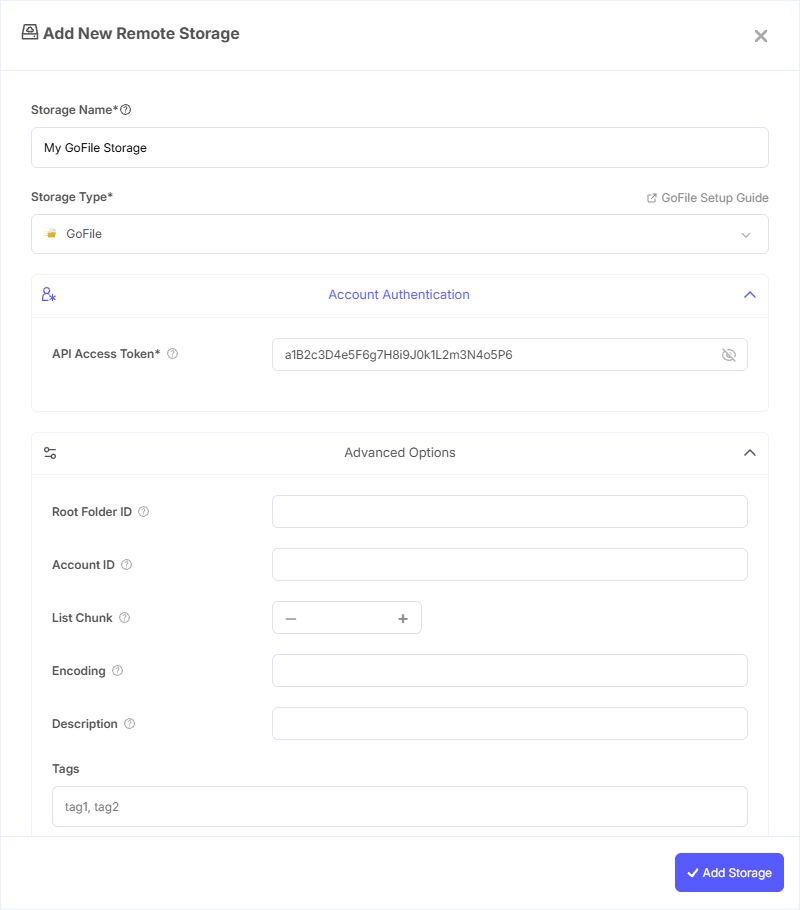
Step 1: Add Storage
- In Pluton, navigate to Storages
- Click Add Storage button
- Select Gofile from the provider list
Step 2: Configure Connection
Fill in the required fields:
- Storage Name: A friendly name (e.g., "Gofile Backups")
- API Access Token: Your Gofile API access token from the web control panel
Step 3: Advanced Options (Optional)
Additional settings available:
- Root Folder ID: Set a specific folder as the root for all operations. Leave blank for automatic detection (recommended)
- Account ID: Your Gofile account ID. Leave blank for automatic detection (recommended)
- List Chunk: Number of items to list in each API call (default: 1000)
Step 4: Test and Save
- Click Test Connection to verify your access token
- If successful, click Save
- Your Gofile storage is now ready for backup plans
Common Issues
Authentication Failure: Verify your API access token is correct. You can regenerate the token from the Gofile My Profile section.
Premium Required: Gofile API access requires a premium account. Free accounts will receive authentication errors.
Root Folder Not Found: If you specified a Root Folder ID, verify the folder ID is correct. You can find folder IDs by listing the root directory contents. Leave this field blank to let Pluton detect it automatically.
Slow Listing: If listing large directories is slow, try reducing the List Chunk value. The default of 1000 works well for most use cases.
Best Practices
- Keep your API access token secure and don't share it publicly
- Leave Root Folder ID and Account ID blank to let Pluton automatically detect the correct values
- Use a premium account for reliable API access and full functionality
- Create a dedicated folder in Gofile for your Pluton backups
- Gofile supports MD5 checksums — Pluton uses these for file integrity verification during backups
- Monitor your Gofile storage usage through the web interface