Connecting Linkbox
This guide walks you through connecting a Linkbox storage destination to Pluton.
Prerequisites
Before connecting Linkbox, you need:
- A Linkbox account — Sign up here
- An API token from your Linkbox account settings
Getting Your Credentials
Step 1: Create a Linkbox Account
- Go to linkbox.to and create an account
- Verify your email address
Step 2: Get Your API Token
- Log into your Linkbox account
- Navigate to your Account Settings
- Locate your API Token
- Copy the token — you'll need it to configure Pluton
Connecting to Pluton
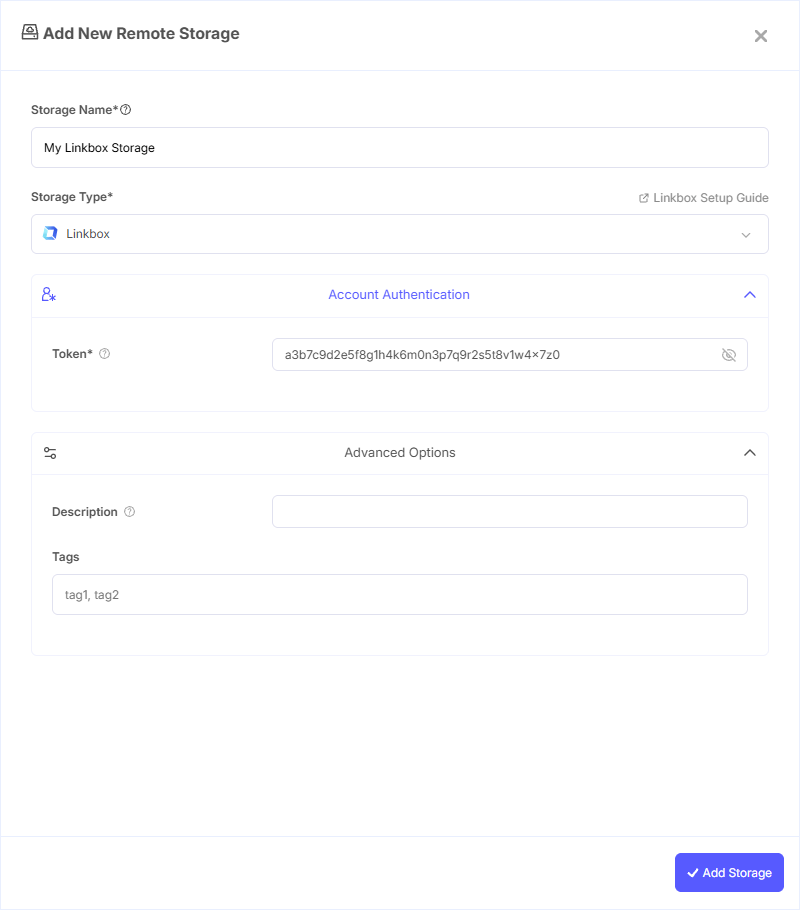
Step 1: Add Storage
- In Pluton, navigate to Storages
- Click Add Storage button
- Select Linkbox from the provider list
Step 2: Configure Connection
Fill in the required fields:
- Storage Name: A friendly name (e.g., "Linkbox Backups")
- Token: Your API token from your Linkbox account settings
Step 3: Complete the Storage Setup
- Click the Add Storage button which automatically verifies credentials and adds the storage.
- Your Linkbox storage is now ready for backup plans
Common Issues
Authentication Failure: Ensure you're using the correct API token from your Linkbox account page at https://www.linkbox.to/admin/account. Regenerate the token if it has expired.
Invalid Characters in Filenames: Linkbox does not support invalid UTF-8 bytes in filenames. These characters will be automatically replaced during upload.
Best Practices
- Keep your API token secure and do not share it
- Regenerate your API token periodically for security
- Use descriptive storage names to easily identify this destination in your backup plans