Connecting IONOS Cloud Object Storage
This guide walks you through connecting an IONOS Cloud Object Storage destination to Pluton.
Prerequisites
Before connecting IONOS Cloud, you need:
- An IONOS account - Sign up here
- S3-compatible Object Storage credentials (Access Key and Secret Key)
- Your IONOS S3 endpoint
Getting Your IONOS Credentials
Step 1: Access Object Storage
- Log into the IONOS Cloud Panel
- Navigate to the Object Storage section
- If not already enabled, activate the Object Storage service
Step 2: Generate S3 Credentials
- Go to Key Management in the Object Storage section
- Click Generate Key
- Copy the Access Key and Secret Key
- Important: Save these credentials securely — the Secret Key is shown only once
Step 3: Create a Bucket
- In the Object Storage section, click Create Bucket
- Enter a unique bucket name
- Select a region (e.g., EU Central, US Central)
- Click Create
Connecting to Pluton
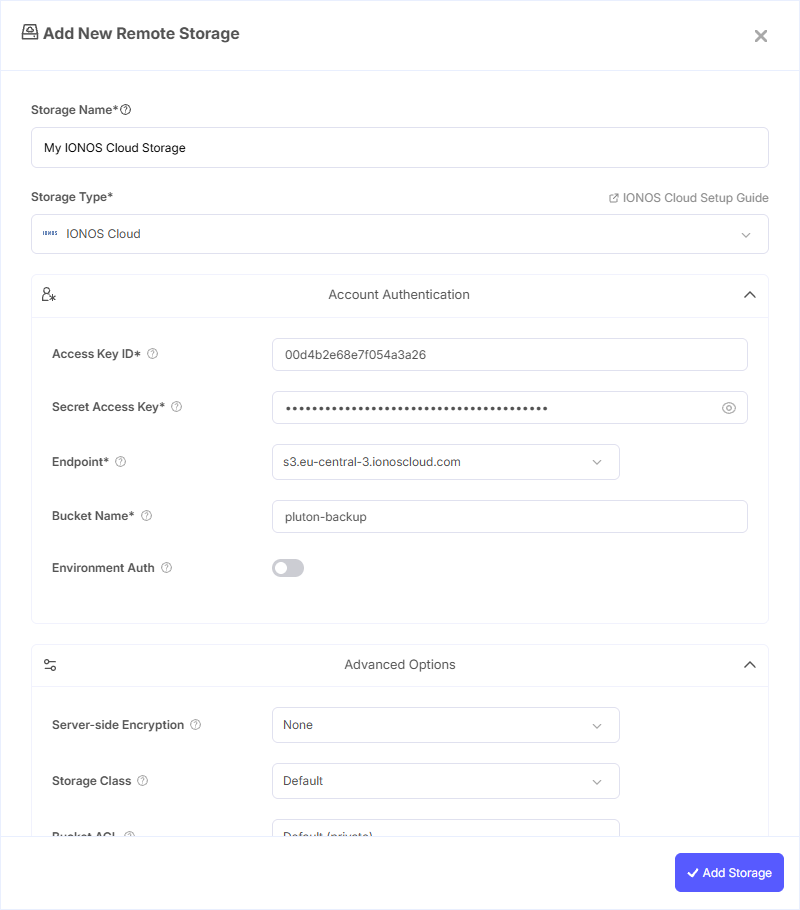
Step 1: Add Storage
- In Pluton, navigate to Storages
- Click Add Storage button
- Select IONOS Cloud from the provider list
Step 2: Configure Connection
Fill in the required fields:
- Storage Name: A friendly name (e.g., "IONOS Cloud Backups")
- Access Key ID: Your IONOS S3 Access Key
- Secret Access Key: Your IONOS S3 Secret Key (password)
- Endpoint: Select your IONOS endpoint (e.g.,
s3.eu-central-3.ionoscloud.com) or enter a custom one - Bucket Name: Your IONOS Bucket Name
Step 3: Advanced Options (Optional)
Additional settings available:
- Server-side Encryption: Choose AES256 or KMS encryption for data at rest
- Storage Class: Select the storage tier for your objects
- Chunk Size: Adjust the chunk size for multipart uploads (default: 5 MiB)
- Upload Cutoff: Set the threshold for switching to chunked uploads (default: 200 MiB)
- Force Path Style: Enable path-style access instead of virtual hosted-style
Step 4: Complete the Storage Setup
- Click the Add Storage button which automatically verifies credentials and adds the storage.
- Your IONOS Cloud storage is now ready for backup plans
Common Issues
Invalid Endpoint: Ensure you're using the correct IONOS S3 endpoint for your region. Common endpoints include s3.eu-central-3.ionoscloud.com and s3.eu-central-1.ionoscloud.com.
Access Denied: Verify your S3 credentials are correct and active. You can regenerate keys from the IONOS Cloud Panel under Key Management.
Bucket Not Found: Ensure the bucket exists in the region matching your selected endpoint. Bucket names must be globally unique within IONOS.
Best Practices
- Use IONOS data centers in your geographic region for compliance and performance
- IONOS Cloud offers GDPR-compliant European data centers — ideal for EU-based organizations
- Create separate buckets for different backup plans for easier management
- Monitor storage consumption through the IONOS Cloud Panel to control costs