Connecting Alibaba Cloud (Aliyun) Object Storage System (OSS)
This guide walks you through connecting an Alibaba Cloud OSS storage destination to Pluton.
Prerequisites
Before connecting Alibaba Cloud OSS, you need:
- An Alibaba Cloud account — Sign up here
- An Access Key ID and Secret Access Key with permissions to manage OSS buckets
Getting Your Alibaba Cloud Credentials
Step 1: Create an Access Key Pair
- Log into the Alibaba Cloud Console
- Hover over your profile icon and select AccessKey Management
- Click Create AccessKey
- Copy both the Access Key ID and Access Key Secret — the secret is shown only once
Step 2: Prepare Your Bucket
- Navigate to the Object Storage Service (OSS) section in the console
- Note the name of the bucket you want to use, or click Create Bucket to make a new one
- Note the Region where your bucket is located (e.g., China (Hangzhou), US (Silicon Valley))
Connecting to Pluton
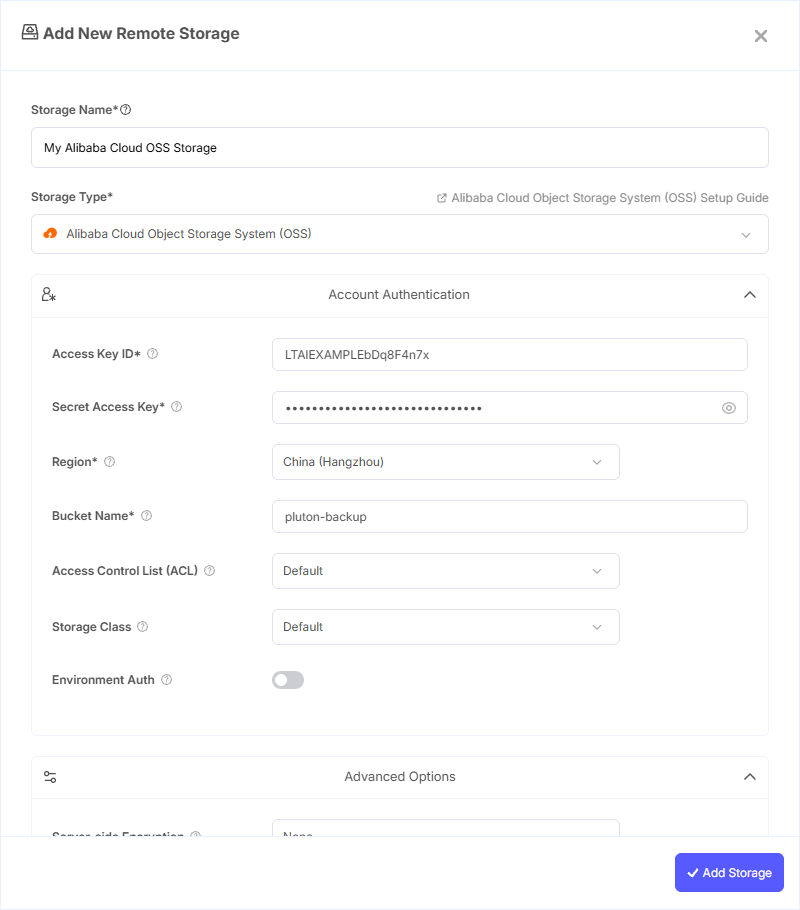
Step 1: Add Storage
- In Pluton, navigate to Storages
- Click Add Storage button
- Select Alibaba Cloud (Aliyun) Object Storage System (OSS) from the provider list
Step 2: Configure Connection
Fill in the required fields:
- Storage Name: A friendly name (e.g., "Alibaba OSS Backups")
- Access Key ID: Your Alibaba Cloud Access Key ID
- Secret Access Key: Your Alibaba Cloud Secret Access Key (password)
- Region: Select the region matching your bucket location. Available regions include China (Hangzhou, Shanghai, Beijing, Shenzhen, Chengdu, Hong Kong), Japan (Tokyo), South Korea (Seoul), Singapore, Malaysia, Indonesia, Philippines, Thailand, Germany (Frankfurt), UK (London), US (Silicon Valley, Virginia), UAE (Dubai), and more. You can also enter a custom endpoint if needed
- Bucket Name: Your Alibaba Cloud OSS Bucket Name
Step 3: Advanced Options (Optional)
Additional settings available:
- Access Control List (ACL): Permissions applied when creating buckets and storing objects. Options include Private, Public Read, and Public Read/Write. Defaults to Private if not set
- Storage Class: The storage class used when storing new objects in OSS
- Server-side Encryption: Encrypt objects at rest using AES256 or AWS KMS
- Bucket ACL: Canned ACL applied specifically when creating buckets
Step 4: Complete the Storage Setup
- Click the Add Storage button which automatically verifies credentials and adds the storage.
- Your Alibaba Cloud OSS storage is now ready for backup plans
Common Issues
Authentication Failure: Double-check that your Access Key ID and Secret Access Key are correct. Ensure the key has not been disabled in the Alibaba Cloud console.
Bucket Not Found: Verify that the selected region matches the region where your bucket was created. OSS endpoints are region-specific.
Permission Denied: Ensure your Access Key has the appropriate RAM policies assigned for OSS read/write access.
Best Practices
- Create a dedicated RAM user with minimal OSS permissions for Pluton
- Use a region geographically close to your Pluton server for faster transfers
- Enable versioning on your OSS bucket for an extra layer of data protection
- Monitor storage usage through the Alibaba Cloud console to manage costs